2021年11月8日 星期一

VB.net 儲存文字檔案


儲存文字檔

VB代码

需要引用 system 和 system.IO

方法1: 利用 StreamWriter 写入文档,值得注意的是,要确定要保存的文件夹已经创建,不然会报错。

1
2
3
        Dim sw As StreamWriter = New StreamWriter("C:\temp\test.txt")
        sw.Write("This is Test Text")
        sw.Close()

方法2: 利用 My.Computer.FileSystem.WriteAllText 写入文档

1
        My.Computer.FileSystem.WriteAllText("C:\temp\test.txt", "This is test Text")

方法3: 利用 System.IO.File.WriteAllText 写入文档

1
        System.IO.File.WriteAllText("c:\temp\test.txt", "this is test file")


VB 代码

方法1:

1
2
3
4
5
6
        Dim sw As StreamWriter = New StreamWriter("C:\temp\test.txt")
        sw.Write("abc" & vbCrLf)
        sw.Close()
        Dim sw2 As StreamWriter = New StreamWriter("C:\temp\test.txt", True)
        sw2.Write("456" & vbCrLf)
        sw2.Close()

方法2:

1
        My.Computer.FileSystem.WriteAllText("test.txt", "This is test Text", True)

方法3:

1
        System.IO.File.AppendAllText("c:\temp\test.txt", "this is extra test file")


VB 代码

1
2
3
4
5
        Dim sw As StreamWriter = New StreamWriter("C:\temp\test.txt")
        Dim strTemp As String = Me.RichTextBox1.Text
        strTemp = strTemp.Replace(vbLf, vbCrLf)
        sw.Write(strTemp)
        sw.Close()


VB代码

1
        RichTextBox1.SaveFile("test.txt", RichTextBoxStreamType.PlainText)


2019年12月19日 星期四

MsgBox (message box) 對話視窗

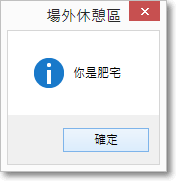
一個msgbox圖片範例:
有時候會看到八~
讓我們一起來做做看八

如果你只是要做簡單的顯示字串的話:
MsgBox("你要顯示的字串")
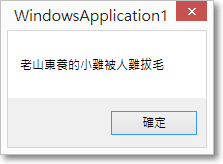
圖片範例:

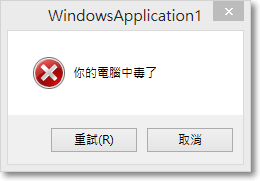
如果你想要做出可以更改圖示及回復按鈕的msgbox的話:
MsgBox("你要顯示的字串", 回復按鈕 + 圖示)
MsgBox("你要顯示的字串", 0 + 64)

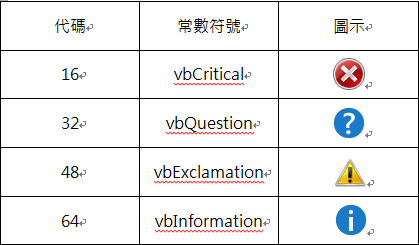
圖示的代碼列表:

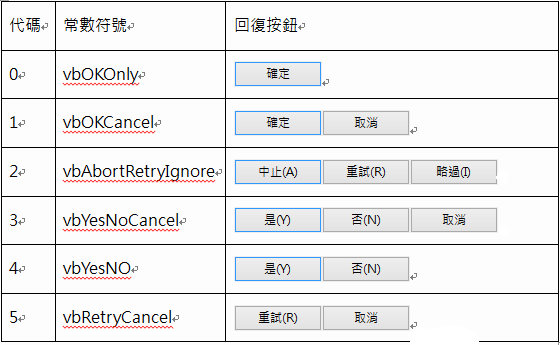
按鈕代碼列表:

如果你要更改msgbox的標題的話:
MsgBox("你要顯示的字串", 回復按鈕 + 圖示,"標題")
範例:MsgBox("你要顯示的字串", 0 + 64,"標題")


如果你要設定msgbox的傳回值得話:
就需要用到If Then了
而他需要判斷按鈕,所以在這邊列了一張圖片
範例:
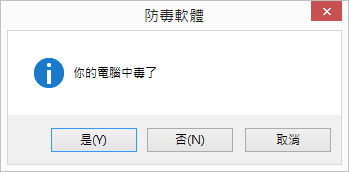
X = MsgBox("你有女朋友嗎", 4 + 32, "小知")
        If X = 6 Then
            MsgBox("好好喔", 0 + 64, "小知")
        Else
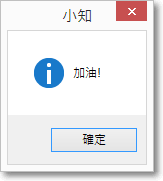
            MsgBox("加油!", 0 + 64, "小知")
        End If
範例圖片:
選是的話:
選否的話


資料來源
https://forum.gamer.com.tw/Co.php?bsn=60030&sn=1605224

電腦發音、音效、音樂

Public Class Form1
    Declare Function Beep Lib "kernel32" (ByVal dwFreq As Integer, ByVal dwDuration As Integer) As Integer
註:將beep改成Console.Beep就不用上面這一Declare Function Beep......

    Private Sub Button1_Click(ByVal sender As System.Object, ByVal e As System.EventArgs) Handles Button1.Click
        '救護車聲
        Dim myAlert As New Threading.Thread(AddressOf Alert)
        Dim I As Short
        For I = 0 To 10
            Beep(1000, 500)
            Beep(2000, 1000)
        Next
    End Sub
  
    Private Sub Button2_Click(ByVal sender As System.Object, ByVal e As System.EventArgs) Handles Button2.Click
        '炸彈掉下聲
        Dim I As Short
        For I = 2500 To 750 Step -10
            Beep(I, 50)
        Next
    End Sub

    Private Sub Button3_Click(ByVal sender As System.Object, ByVal e As System.EventArgs) Handles Button3.Click
        '生日快樂
        Dim i() As Integer = {392, 392, 440, 392, 523, 494, 392, 392, 440, 392, 587, 523, 392, 392, 784, 659, 523, 494, 440, 698, 698, 659, 523, 587, 523}
        Dim j() As Integer = {375, 125, 500, 500, 500, 1000, 375, 125, 500, 500, 500, 1000, 375, 125, 500, 500, 500, 500, 1000, 375, 125, 500, 500, 500, 1000}
        Dim ak As Integer
        For ak = 0 To i.Length - 1
            Beep(i(ak), j(ak))
        Next
    End Sub

    Private Sub Button4_Click(ByVal sender As System.Object, ByVal e As System.EventArgs) Handles Button4.Click
        '警報聲
        Dim I As Short
        For I = 0 To 20

            Beep(75, 200)
            Beep(400, 200)
        Next
    End Sub

    Private Sub Button5_Click(ByVal sender As System.Object, ByVal e As System.EventArgs) Handles Button5.Click
        '單聲
        Console.Beep()
    End Sub

    Private Sub Button6_Click(ByVal sender As System.Object, ByVal e As System.EventArgs) Handles Button6.Click
        Dim myAlert As New Threading.Thread(AddressOf Alert)
        myAlert.Start()
    End Sub
    Sub Alert()
        Dim I As Short
        For I = 2500 To 750 Step -10
            Beep(I, 50)
            'Beep(I, 100)
        Next
    End Sub
End Class
-------------------------------------------------------------------------------------------------------------
●MSDN的描述:The Beep function generates simple tones on the speaker. The function is synchronous; it does not return control to its caller until the sound finishes.
●小站已測試平台:Windows9x、Windows NT4、Windows 2000、Windows XP
●建議宣告法: 'VB6
Declare Function Beep Lib "kernel32" (ByVal dwFreq As Long, ByVal dwDuration As Long) As Long
--------------------------------------------------------------------------------
 'VB.Net宣告
Declare Function Beep Lib "kernel32" (ByVal dwFreq As Integer, ByVal dwDuration As Integer) As Integer 
●用法範 例:
●VB6警車聲
Private Sub Form_Activate()
    For I = 0 To 10
        Beep 75, 200
        Beep 400, 200
        DoEvents
    Next
End Sub 
●VB.Net警車聲
Private Sub Button1_Click(ByVal sender As System.Object, ByVal e As System.EventArgs) Handles Button1.Click
    Dim myAlert As New Threading.Thread(AddressOf Alert)
    myAlert.Start()
End Sub
Sub Alert()
    Dim I As Short
    For I = 0 To 10
        Beep(75, 200)
        Beep(400, 200)
    Next
End Sub 

●VB6卡通墜落聲
Private Sub Form_Activate()
    For I = 2500 To 750 Step -10
        Beep I, 50
        DoEvents
    Next
End Sub 
●VB.Net警車聲
Private Sub Button1_Click(ByVal sender As System.Object, ByVal e As System.EventArgs) Handles Button1.Click
    Dim myAlert As New Threading.Thread(AddressOf Alert)
    myAlert.Start()
End Sub
Sub Alert()
    Dim I As Short
    For I = 2500 To 750 Step -10
        Beep(I, 50)
    Next
End Sub 

●dwFreq→頻率(Hz)
●dwDuration→播放時間(千分之一秒)

不會當掉的VB.net Delay (Sleep)

Public Sub delay(ByVal TimeLast) Dim Start As Integer = Environment.TickCount() 'Dim TimeLast As Integer = 7000 ' 要延遲 t 秒,就設為 t *1000 Do If Environment.TickCount() - Start > TimeLast Then Exit Do Application.DoEvents() ' 要記得寫這行,不然都在跑迴圈,畫面可能會不見 Loop End Sub

2015年2月9日 星期一

VB6 等待 做其他事 釋放資源 delay

請你使用timer元件,配合下列副函數,如"wait 5"就是等待5秒
Private Sub Wait(iSec As Long)
Dim iTimer As Long

    iTimer = Timer
    Do Until Timer - iTimer >= iSec
     DoEvents
    Loop
End Sub

2014年6月30日 星期一

文字檔開啟

一、直接使用File opentext的方式
Dim sr As StreamReader = File.OpenText("utf.txt")
二、使用FileInfo的方法
Dim file1 As FileInfo = New FileInfo("b12.txt")
Dim sr As StreamReader = file1.OpenText()
三、使用 File 的 OpenText 或 FileInfo 的 OpenText 預設都以 UTF-8 編碼方式開啟檔案,若遇上文字檔本身並非UTF存檔,會有亂碼產生。若需指定編碼開啟,需使用如下:
Dim sr As StreamReader = My.Computer.FileSystem.OpenTextFileReader("b12.txt", System.Text.Encoding.Default)
Default: 是使用文預設的編碼方式開啟

2014年6月28日 星期六

判斷路徑資料夾是否存在及建立資料夾

VB.NET
判別路徑資料夾是否存在:
 If Not IO.Directory.Exists("Path+資料夾名稱") Then

            '如不存在,建立資料夾
            IO.Directory.CreateDirectory("Path+資料夾名稱")
 End If


判別路徑檔案是否存在:
 System.IO.File.Exists("Path+FileName")

http://programlanguagebymingze.blogspot.tw/2012/10/vbnet.html

2014年6月13日 星期五

模擬鍵盤(文字輸入 自動輸入 打字)

1Private Sub Button1_Click(ByVal sender As Object, ByVal e As EventArgs) 
2  '送出CTRL+C(複製) 
3  'SendKeys.Send("^C") 
4  '送出CTRL+X(剪下) 
5  'SendKeys.Send("^X") 
6  '送出CTRL+V(貼上) 
7  SendKeys.Send("^V") 
8End Sub 


1Private Sub Button1_Click(ByVal sender As Object, ByVal e As EventArgs) 
2       If Me.DataGridView1.SelectedCells.Count > 0 Then 
3          '送出CTRL+C(複製) 
4          'SendKeys.Send("^C") 
5       End If 
6       TextBox1.Focus() 
7       '送出CTRL+V(貼上) 
8       SendKeys.Send("^V") 
9End Sub 


http://www.blueshop.com.tw/board/show.asp?subcde=BRD20110708100140U3F

複製剪貼簿文字(複製、貼上 Ctrl C、Ctrl V)

.net平台中剪貼簿(ClipBoard)被拉到My.Computer.Clipboard下
不過實際存取時,可以省略 My.Computer
'記事本複製功能
Clipboard.Clear()
Clipboard.SetText(TextBox1.SelectedText)
'記事本剪下功能
Clipboard.Clear()
Clipboard.SetText(TextBox1.SelectedText)
Textbox1.SelectedText = ""
'記事本貼上功能
TextBox1.SelectedText = Clipboard.GetText()
PS SelectedText 同 VB6 的SelText


http://jeremy.ssinrc.org/?p=65

2014年6月4日 星期三

VB.net Unicode 轉 Big5 "&#OOOO;" 網頁亂碼 瀏覽器

        '將網頁的Unicode 轉 Big5 (【)
        For i = 0 To strSubTitle.Length - 1

            Dim tmpS As String = strSubTitle(i)
            tmpS = Replace(tmpS, "&#", "")
            strNewTitle = strNewTitle & ChrW(tmpS)
        Next

        strTitle = strNewTitle
        tbxTitle.Text = strTitle

2014年6月3日 星期二

VB.net 字串格式 Format

Format是VB.Net中很好用,不需死記參數,很人性化的格式化Function,舉例:
123456789 (三位一撇千分位)
Format(123456789, "###,###")    OutPut ; 123,456,789
0.2666666 (小數點後兩位,四捨五入,並加上%)
Format(0.2666666,"0.00%")         OutPut  : 26.67%
 千分位,小數點捨去
Format(Val(strValue.ToString), "###,##0")


2014年6月2日 星期一

VB.net 一次控制全部元件(TextBox等)

        Dim Command1() As TextBox = _
            {tbPanel1, tbPanel2, tbPanel3, tbPanel4, tbPanel5, tbPanel6, tbPanel7, tbPanel8, tbPanel9, tbPanel10}


            If ComboBox9.SelectedIndex >= i Then
                Command1(i).Visible = True
            Else

VB.net 拆字串 分割字串 切字串

text.Split(",")


Dim strMember1 As String() = strTemp.Split(vbCrLf)    '分行切割

Dim strMember2 As String() = strMember1(intSelected).Split(",")

        strMember3(intSelected) = strMember2(0).Trim()   '去空白 姓名
        TextBox1.Text = strMember3(intSelected)

VB.net 去空白 去換行

.Trim()

strMember3(intSelected) = strMember2(0).Trim()   '去空白 姓名

VB.net 換行符號(vbcrlf)

換行符號: vbcrlf

Tab: vbTab

網頁自動登入登出程式

http://tomshare.idv.tw/article/vb-net_auto_login_logout/


VB打開網頁超連結Url

VB創建超連結 打開指定網站的幾種方法

方法一:
Shell "Rundll32.exe url.dll, FileProtocolHandler HTTP://tw.yahoo.com", vbNormalFocus

方法二:
Shell "C:\Program Files\Internet Explorer\IEXPLORE.EXE " & Text1.Text, vbMaximizedFocusEnd Sub

方法三:
Shell ("explorer HTTP://tw.yahoo.com "), vbNormalFocus

方法四:
Public Declare Function ShellExecute Lib "shell32.dll " Alias "ShellExecuteA " (ByVal hwnd As Long, ByVal lpOperation As String, ByVal lpFile As String, ByVal lpParameters As String, ByVal lpDirectory As String, ByVal nShowCmd As Long) As Long

ShellExecute 0, " ", " HTTP://tw.yahoo.com", " ", " ", 5


2014年5月25日 星期日

VB.net - 提示視窗、跳出視窗(Msgbox)


我的範例:

            Dim response As MsgBoxResult
            response = MsgBox(strProofing, vbYesNo + vbExclamation, "內容確認")

            If response = MsgBoxResult.No Then
                Exit Sub
            End If


範例:
Dim msg As String
Dim title As String
Dim style As MsgBoxStyle
Dim response As MsgBoxResult
msg = "Do you want to continue?"   ' Define message.
style = MsgBoxStyle.DefaultButton2 Or _
   MsgBoxStyle.Critical Or MsgBoxStyle.YesNo
title = "MsgBox Demonstration"   ' Define title.
' Display message.
response = MsgBox(msg, style, title)
If response = MsgBoxResult.Yes Then   ' User chose Yes.
   ' Perform some action.
Else
   ' Perform some other action.
End If


Public Function MsgBox( _
   ByVal Prompt As Object, _
   Optional ByVal Buttons As MsgBoxStyle = MsgBoxStyle.OKOnly, _
   Optional ByVal Title As Object = Nothing _
) As MsgBoxResult


Prompt
必要項。顯示為對話方塊中訊息的 String 運算式。視使用的字元寬度而定,Prompt 的最大長度大約是 1024 個字元。如果 Prompt 是由一行以上所組成,則您可在每一行之間使用歸位字元 (Chr(13))、換行字元 (Chr(10)) 或歸位/換行字元的組合 (Chr(13) & Chr(10)),來隔開這些行。
Buttons
選擇項。數值運算式,這個值總和指定要顯示的按鈕數目和類型、要使用的圖示樣式、預設按鈕的識別及訊息方塊的強制回應性。如果省略 Buttons,則預設值為零。
Title
選擇項。顯示在對話方塊標題列中的 String 運算式。如果省略 Title,則會將應用程式名稱放置在標題列中。


下表所列為 MsgBoxStyle 列舉值。
成員
值
描述
OKOnly
0
僅顯示 [確定] 按鈕。
OKCancel
1
顯示 [確定] 和 [取消] 按鈕。
AbortRetryIgnore
2
顯示 [中止]、[重試] 和 [忽略] 按鈕。
YesNoCancel
3
顯示 [是]、[否] 和 [取消] 按鈕。
YesNo
4
顯示 [是] 和 [否] 按鈕。
RetryCancel
5
顯示 [重試] 和 [取消] 按鈕。
Critical
16
顯示 [重大訊息] 圖示。
Question
32
顯示 [警告查詢] 圖示。
Exclamation
48
顯示 [警告訊息] 圖示。
Information
64
顯示 [資訊訊息] 圖示。
DefaultButton1
0
第一個按鈕是預設值。
DefaultButton2
256
第二個按鈕是預設值。
DefaultButton3
512
第三個按鈕是預設值。
ApplicationModal
0
應用程式是強制回應的。使用者必須在繼續使用目前應用程式之前先回應訊息方塊。
SystemModal
4096
系統是強制回應的。所有的應用程式都會暫止,直到使用者對訊息方塊做出回應時為止。
MsgBoxSetForeground
65536
將訊息方塊視窗指定為前景視窗。
MsgBoxRight
524288
文字靠右對齊。
MsgBoxRtlReading
1048576
指定在希伯來文或阿拉伯文的系統上,文字應該以從右到左的書寫方式呈現。
第一個值群組 (0-5) 描述對話方塊中所顯示的按鈕數目和型別。第二個群組 (16、32、48、64) 描述圖示樣式。第三個群組 (0、256、512) 判斷哪個是預設值。第四個群組 (0、4096) 判斷訊息方塊的形式,而第五個群組則指定訊息方塊視窗是否為前景視窗,以及文字的對齊和方向。當加入數字來建立 Buttons 引數的最後值時,只能使用每個群組當中的一個數


http://msdn.microsoft.com/zh-tw/library/139z2azd(v=vs.90).aspx